


A patient cancels. Your front desk gets the call, updates the schedule, and moves on to the next task. The slot sits empty. At the end of the day, that gap represents real revenue that didn't have to disappear. It just wasn't recovered fast enough.
For most practices, this plays out dozens of times a week. The problem isn't that cancellations happen. They always will. The problem is what happens, or doesn't happen, in the minutes after a slot opens up.
Why manual rebooking fails
The traditional approach to filling a cancelled slot goes something like this: a front desk staff member notices the opening, thinks of a patient who might want to come in sooner, looks up their contact information, calls them, leaves a voicemail, waits, calls again, and eventually either fills the slot or gives up. If they're lucky, this process takes 20 minutes. If they're busy, which front desk staff almost always are, it doesn't happen at all.
The math works against manual rebooking in another way too. A cancellation that comes in at 4pm for a 9am appointment the next morning gives your team a narrow window to respond. By the time anyone gets to it, the opportunity may already be gone.
Manual processes also depend on individual staff members knowing who to call, having time to call them, and remembering to follow up. That's a lot of single points of failure for something that happens multiple times a day.
What a modern rebooking workflow looks like
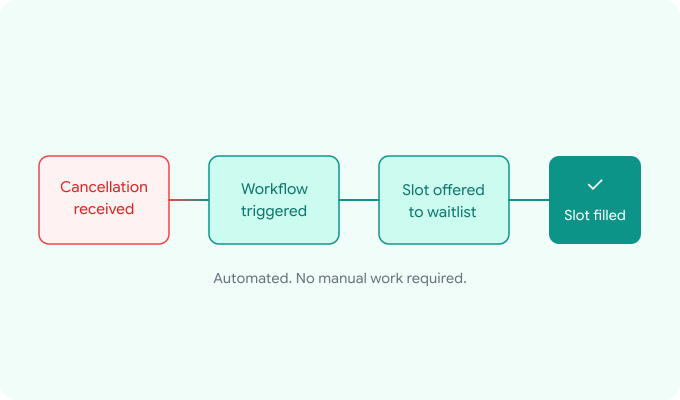
An automated rebooking workflow removes the dependency on staff availability and replaces it with a consistent, immediate process. Here's what that looks like in practice:
Step 1: Cancellation is detected.When a patient cancels, whether by phone, text, or through a patient portal, the workflow is triggered automatically. No staff action required.
Step 2: The open slot is identified. The system knows the time, provider, and appointment type of the newly open slot. This context matters because not every patient is a fit for every slot.
Step 3: The waitlist is activated.Patients who have expressed interest in earlier availability, either by joining a waitlist directly or by being flagged during scheduling, are notified immediately. The notification is typically a text message that lets them claim the slot with a single reply or tap.
Step 4: The slot is claimed or escalated.If a waitlisted patient claims the slot, the booking is confirmed automatically and both the patient and provider are notified. If no waitlisted patient responds within a defined window, the system escalates, either by broadening outreach, offering the slot to other eligible patients, or alerting the front desk to handle it manually.
Step 5: The outcome is logged. Whether the slot was filled or remained open, the system records what happened. Over time, this data helps practices understand their cancellation patterns and refine their rebooking logic.
The waitlist is the key variable
The effectiveness of any rebooking workflow depends heavily on the quality of the waitlist behind it. A waitlist that's empty or poorly maintained can't fill slots, no matter how good the automation is.
Building a usable waitlist starts at the point of scheduling. When a patient books an appointment that's several weeks out, a simple prompt ("Would you like to be notified if an earlier slot opens up?") captures genuine demand that would otherwise go untracked. Patients who say yes are exactly the right candidates for rebooking outreach: they've already committed to coming in, they just want to come in sooner.
Practices that actively maintain their waitlists, adding to it during scheduling, keeping it current, and reaching out promptly when slots open, recover a meaningfully higher percentage of cancelled slots than those that rely on ad hoc manual outreach.
What this means for revenue
The revenue impact of a well-functioning rebooking workflow compounds quickly. Consider a practice with 150 weekly appointments and a 20% cancellation rate: that's 30 cancelled slots per week. If even a third of those slots are recovered through automated rebooking, that's 10 additional appointments per week that would otherwise have been lost. At an average appointment value of $180, that's $1,800 per week, nearly $94,000 per year.
Those numbers will vary significantly based on practice size, specialty, and patient mix. But the underlying principle holds across virtually every practice type: cancellations are a predictable source of revenue loss, and an automated rebooking workflow is the most reliable way to recover it.
The difference between reactive and proactive
Most practices handle cancellations reactively: they respond to the gap after it appears. A modern rebooking workflow is proactive. It anticipates that cancellations will happen, builds the infrastructure to respond to them instantly, and removes the burden from staff entirely.
The goal isn't to eliminate cancellations. It's to make sure that when they happen, the practice has a system ready to respond faster than anyone could manually, and to fill the slot before the revenue is gone.